
I built this after completing an intensive four-week ML training program. The goal was to go beyond the tutorial and put together a real, end-to-end system. Not just a notebook that outputs a prediction, but something with a training pipeline, a deployment gate, a live endpoint, and model monitoring. I picked house prices as the use case, wrote everything in Python, and ran the whole pipeline through AWS SageMaker.
One of the first things you learn in any serious ML program: don’t reach for a model before you understand the problem. A simpler heuristic or rules-based system might do the job with less cost and complexity. The model is the last piece, not the first. That lesson shaped how I approached this.
Here’s how the system came together.
Exploratory Data Analysis
Before writing a line of model code, you need to understand the data. Examining the columns, visualizing distributions, identifying null values, and reviewing the correlation matrix helps determine which model type is appropriate and which features carry the most predictive weight. It also informs decisions about feature engineering: what needs to be encoded, scaled, or imputed.
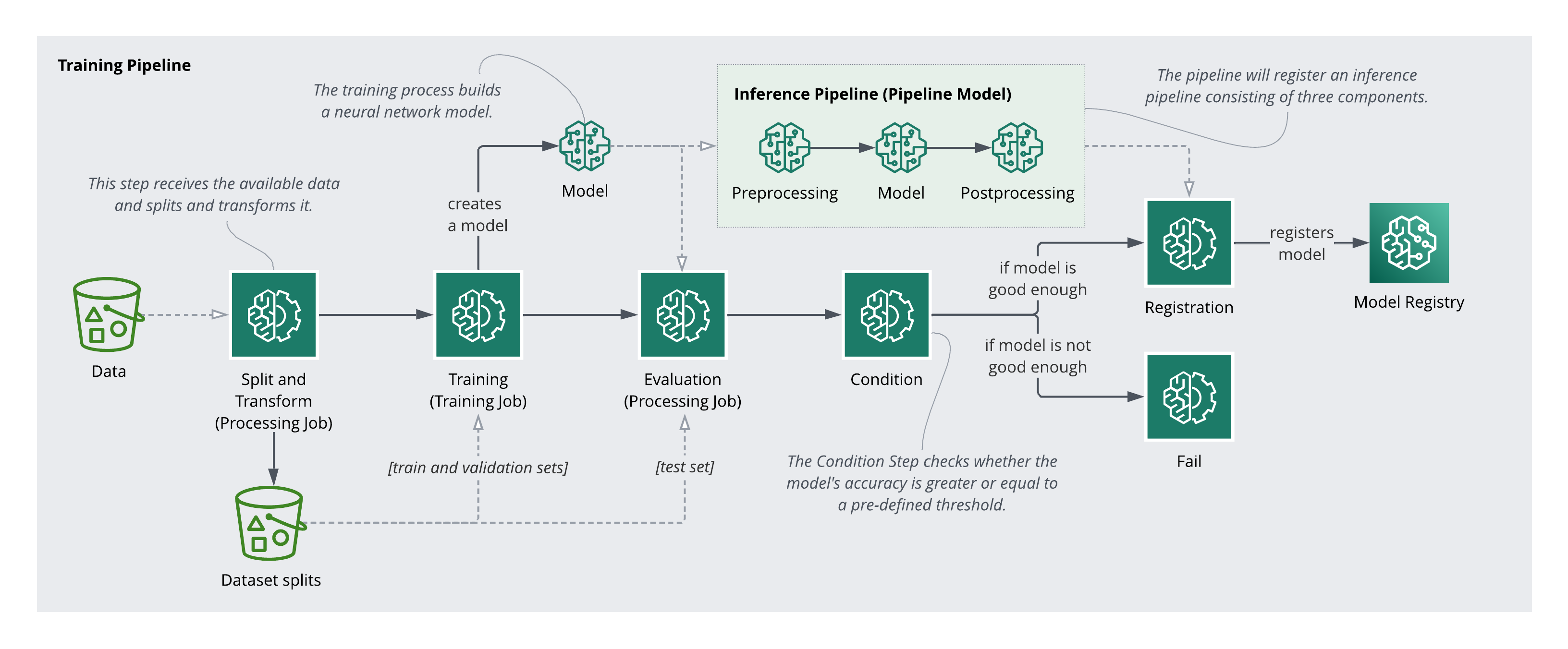
Here’s an overview of the steps involved in the training pipeline:
Preprocessing
The preprocessing pipeline handles data splitting and feature transformation. The splits are necessary for training and evaluation. The transformers are equally important post-deployment. Any transformation applied during training must be applied identically to incoming inference requests.
Under the hood, I used a Scikit-Learn Pipeline for transformations and a Processing Step with an SKLearnProcessor to execute a preprocessing script as a managed SageMaker job.
Training
Training is an iterative process involving experimentation, data exploration, and revisiting preprocessing decisions. For this project, a TensorFlow Keras Sequential Neural Network was used as the estimator, a regression model trained on a selected subset of features, wired into the pipeline as a Training Step.
Evaluation and Versioning
The model was evaluated on the held-out test set, and a conditional deployment step was added to the pipeline. Only models that meet a minimum performance threshold on unseen data can be registered. When the condition passes, the model version is incremented and registered in the SageMaker Model Registry.
Deployment and Serving
Deployment involves packaging the pre- and post-processing logic alongside the model into a pipeline for serving. Inputs arriving at the endpoint must be transformed the same way the training data was: encoding, scaling, and all. Once the full inference pipeline is configured, an endpoint can be deployed and predictions served in real time.
Model Monitoring
Every model performs well on day one. The harder problem is catching degradation over time. Monitoring requires comparing production traffic against the training baseline to detect data drift, and comparing predictions against some form of ground truth to track model performance. This involves labeling infrastructure, but it is essential to ensure the model continues to perform as the world changes, and to know when it is time to retrain.
What I Took Away
Building this taught me as much about AWS infrastructure as it did about ML. SageMaker Pipelines, the Model Registry, endpoint deployment. None of that was in the training program. The model itself was almost the easy part. The harder work was wiring up the system around it: preprocessing that travels with the model, evaluation gates that prevent bad versions from deploying, monitoring that catches drift before users do.
The interactive demo that originally shipped with this post has been retired (the inference endpoint was shut down to avoid ongoing cloud costs), but the pipeline architecture and lessons hold.